ClerkMinutes for City Clerks
The whole council meeting, handled.
Agenda to posted minutes, for city council and every committee behind it. Built for city clerks in cities of 200,000 and cities of 2,000.
Start Free Trial Now
First 14 days completely free. No credit card required.
City Council
Planning Commission
Zoning Board
Parks Board
Work Sessions
Trusted by 500+ municipalities
City of Newport News
Puyallup
Oregon City
City of Naples
Williamsburg
Sierra Madre
161
cities run their meetings on ClerkMinutes
500+
clerks chose it themselves, all self-serve
186,000
residents in the largest ClerkMinutes city
Council is Monday. Planning commission is Tuesday. The minutes are due yesterday.
City clerks run more public meetings than anyone else in the building. Council, work sessions, planning, zoning, parks, utilities. Every one of them needs an agenda before and minutes after, and there is exactly one of you. ClerkMinutes takes the meeting cycle off your desk: the agenda builds itself from your items, the packet assembles itself, and the minutes come back board-ready in your format, on your letterhead. You review, approve, and post.

How ClerkMinutes works for a city
Step 1
Before the meeting
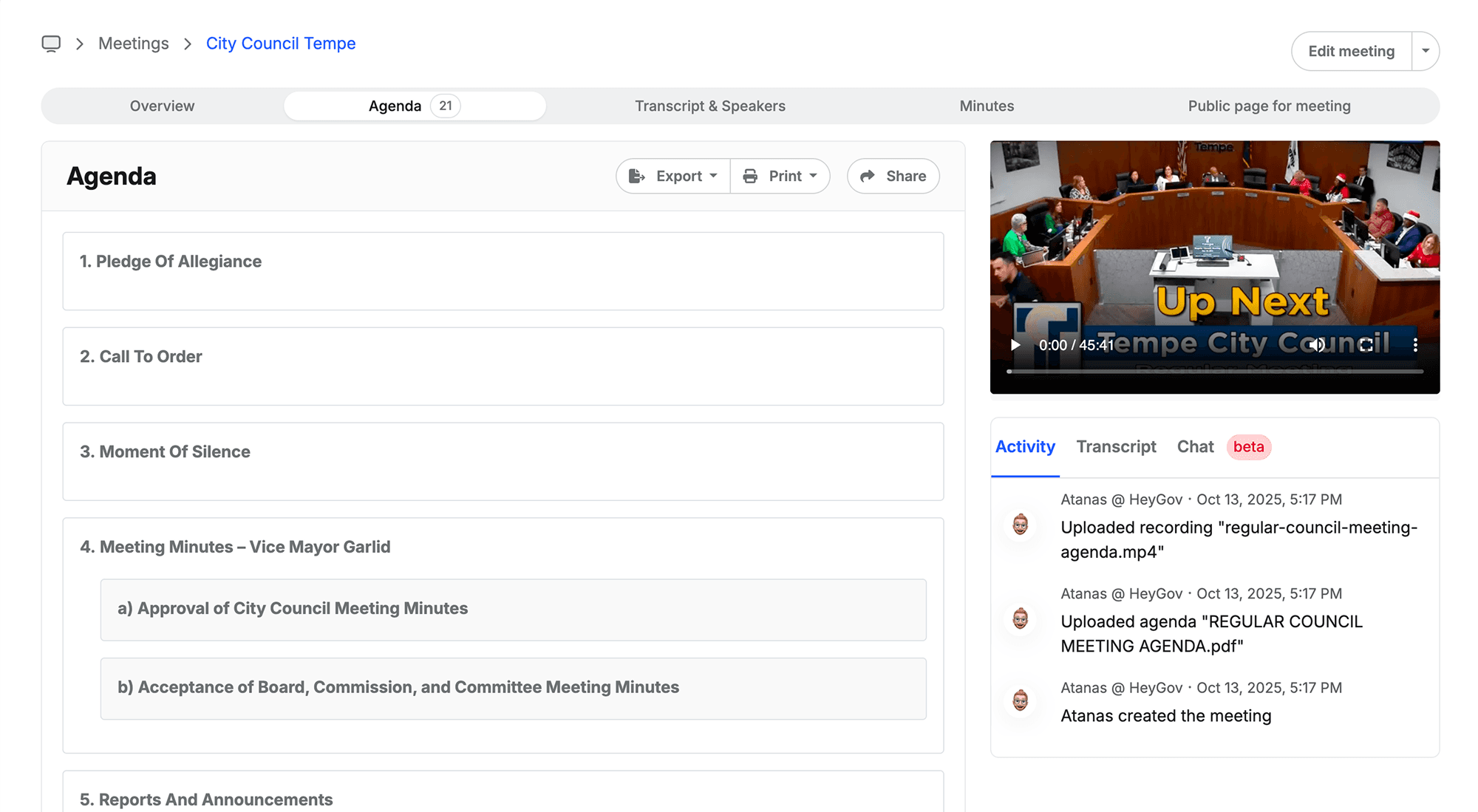
Build the agenda and packet for council or any committee, in minutes.
Step 2
During the meeting
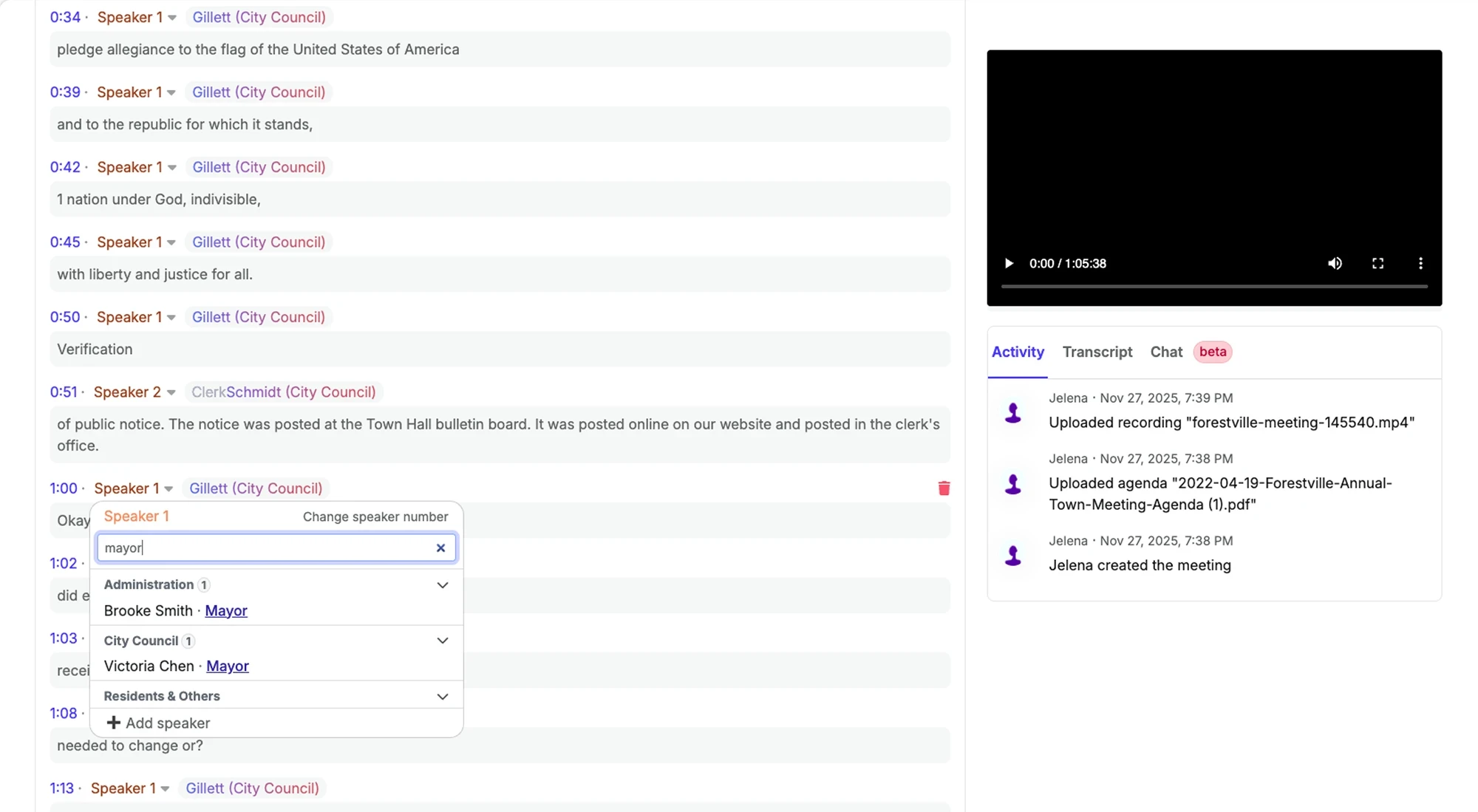
Record it. ClerkMinutes tracks who said what.

Step 3
After the meeting
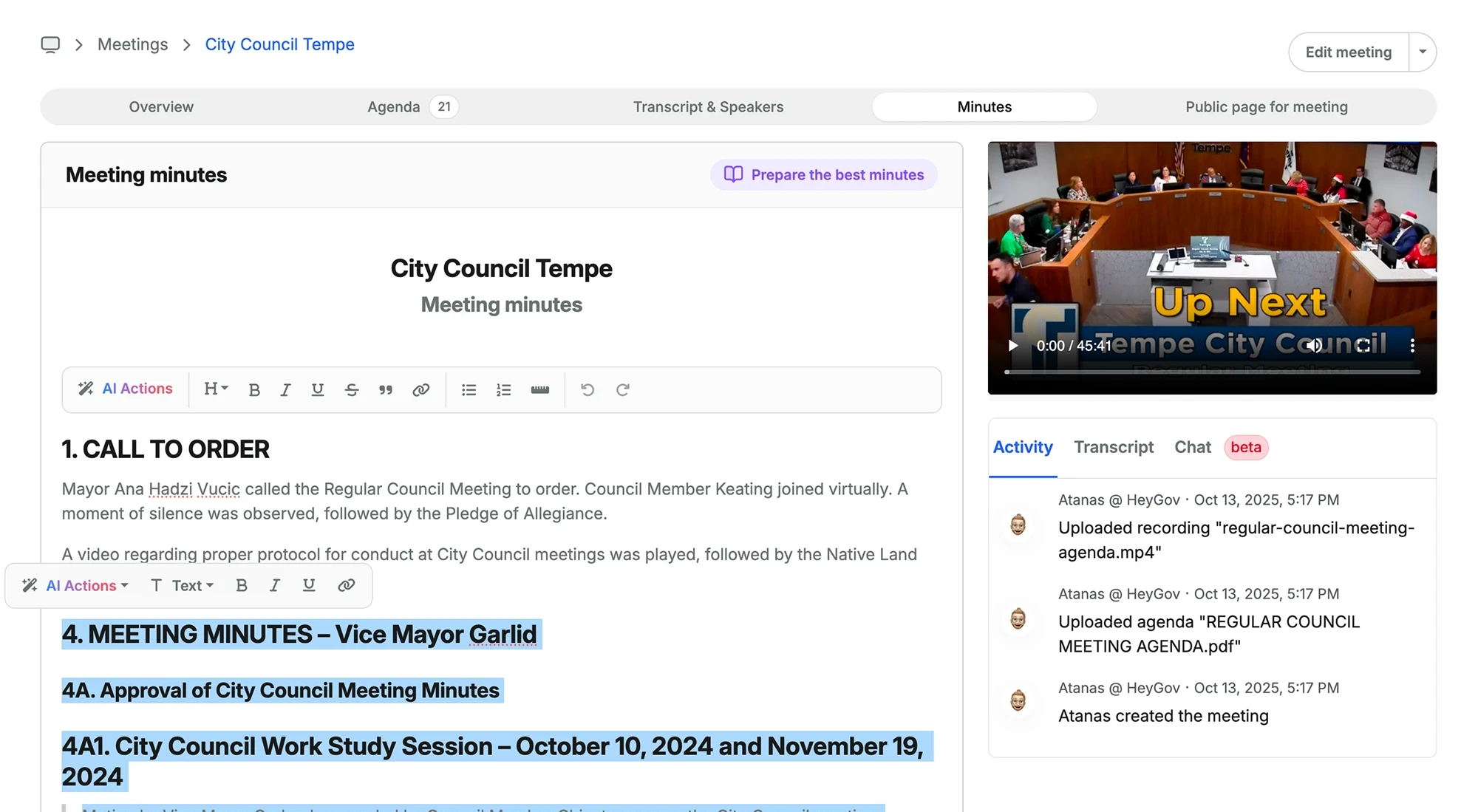
Minutes arrive board-ready. Edit, approve, export as DOC or PDF, and publish agendas and minutes straight to your website.


How ClerkMinutes Works for a City
Step 1
Upload Your Agenda
Upload your meeting agenda to ClerkMinutes®. This helps the AI understand the structure and context of the meeting.

Step 2
Upload the
Meeting Recording
Upload your audio or video recording of the meeting. ClerkMinutes® accepts various file formats and can integrate with popular recording software (like YouTube and Zoom)

Step 3
Assign Speakers
to the Dialog
Review the initial transcription and assign names to speaker segments. ClerkMinutes® uses AI to suggest speaker identities, which you can quickly confirm or correct.

Step 4
Generate Minutes
& Customize
ClerkMinutes® generates a draft of your minutes based on the agenda, transcription, and speaker assignments. Use our intuitive editor & AI Actions to make any necessary adjustments, add context, or highlight key points. Download as a Word or PDF

Why city clerks pick it
Made for clerks, not for procurement
Published pricing, self-serve trial, and you decide. No RFP, no sales demo you did not ask for.


Every committee, one system
Council tonight, planning commission tomorrow, same workflow. Minutes come out the way your council expects them, on your letterhead.
Which plan fits a city?
Most cities start on Starter: 5 meetings and 3 boards fits council plus a committee or two. Cities above roughly 10,000 residents usually have more active boards than that, and choose Growth. Start on Starter today and change plans whenever the calendar demands it.
Starter
For smaller municipalities looking to get started with AI for meeting minutes
$99 / month
5 Monthly meetings
3 Team members
3 Boards/Departments
Support is included
Export as .DOC or .PDF
Publish Agendas & Minutes on your website
Start Free Trial Now
Growth
Ideal for busier municipalities with more departments & users
$249 / month
10 Monthly meetings
10 Team members
10 Boards/Departments
Support is included
Export as .DOC or .PDF
Publish Agendas & Minutes on your website
Customizable Letterhead
Collaborative Agenda Builder
Send out Notifications to Subscribers
Start Free Trial Now
ClerkMinutes has saved me hours of work every week, but more importantly it has given me a mental reprieve. Minutes used to take up to 7-8 hours to fully complete and was a total drag & mental drain. And now, believe it or not, I can get minutes done within 2-3 hours.

Tyler Cameron
City Recorder at City of Providence, UT
Frequently Asked Questions
Can ClerkMinutes handle just council meetings, or also for different commitees?
It can handle all types! Every plan covers multiple board and departments, so planning commission and park board minutes work just like city council minutes. Each department can have it's own template/letterhead so the look and feel remains unique for each department in your city.
Will the minutes match our current format & style?
Yes! ClerkMinutes learns your layout and produces minutes in your structure, on your own customizable letterhead, as a DOC or PDF.
Can we publish agenda and minutes to our city website from within ClerkMinutes?
ClerkMinutes® is purpose-built for municipal meetings. It understands agendas, motions, seconds, and roll calls, not just general text. It structures your minutes automatically, applies clerk-approved formatting, and ensures compliance-ready records without manual editing.
How is this different from just using ChatGPT, Claude, or Gemini?
ClerkMinutes® is purpose-built for municipal meetings. It understands agendas, motions, seconds, and roll calls, not just general text. It structures your minutes automatically, applies clerk-approved formatting, and ensures compliance-ready records without manual editing.
How is this different from just using ChatGPT, Claude, or Gemini?
ClerkMinutes® is purpose-built for municipal meetings. It understands agendas, motions, seconds, and roll calls, not just general text. It structures your minutes automatically, applies clerk-approved formatting, and ensures compliance-ready records without manual editing.
How is this different from just using ChatGPT, Claude, or Gemini?
ClerkMinutes® is purpose-built for municipal meetings. It understands agendas, motions, seconds, and roll calls, not just general text. It structures your minutes automatically, applies clerk-approved formatting, and ensures compliance-ready records without manual editing.
How is ClerkMinutes different from other transcription tools?
Otter and similar tools focus on transcription only. ClerkMinutes® goes further by turning those transcripts into formatted, publish-ready minutes that match your municipality’s structure. It even tags motions, seconds, votes, and attendees automatically.
Can it distinguish who’s speaking?
Yes. ClerkMinutes® automatically identifies and labels each speaker during the meeting, even suggesting names based on your board roster. Simply confirm or correct them once, and ClerkMinutes will remember for every meeting going forward.
Can it really understand government terminology?
Yes. ClerkMinutes® has been trained specifically on municipal meeting data, agendas, and minutes templates from hundreds of towns. It recognizes terms like “motion carried,” “roll call,” “adjourned”, and “consent agenda.”
How accurate are the transcriptions?
Accuracy depends on audio quality, but ClerkMinutes® uses advanced speech models tuned for council chambers and multiple speakers. You can review, correct, and reprocess segments easily before finalizing.
Can it work with our existing recording system?
Yes. ClerkMinutes® accepts audio or video from YouTube, Zoom, or local recording devices. No special setup required.
Can multiple staff members collaborate?
Yes. Team members can upload files, review drafts, and edit collaboratively within the same secure workspace. To support different team sizes, choose the plan that best fits your needs. The Starter plan includes up to 3 users and departments, while the Growth plan supports up to 10 users and departments.
What if we don’t have great audio quality?
We’ve built tools to handle less-than-perfect recordings. You can reprocess segments or upload cleaner audio for best results.
Do I need training to use it?
No. It’s intuitive and built for clerks, not techies. Most users complete their first meeting within minutes of signing up.
ClerkMinutes
AI-Powered Meeting Minutes for Municipal Clerks. Finish your Minutes in Minutes!
Generate, review, and publish flawless meeting minutes in record time. Just upload your agenda and recording, and ClerkMinutes does the rest.
ClerkMinutes
®
HeyGov, Inc.
Sturgeon Bay, Wisconsin
Toll-Free :
Email:
Get the real AI impacts inside local government
A concise weekly briefing translating AI, regulation, and state policy into practical workflow implications for local government.