How to Set Up Collaborative Agenda Review Without the Email Thread That Never Ends
City clerks running agenda review over email spend more time managing submissions than building the agenda. Here’s how to set up a structured collaborative process that actually works.
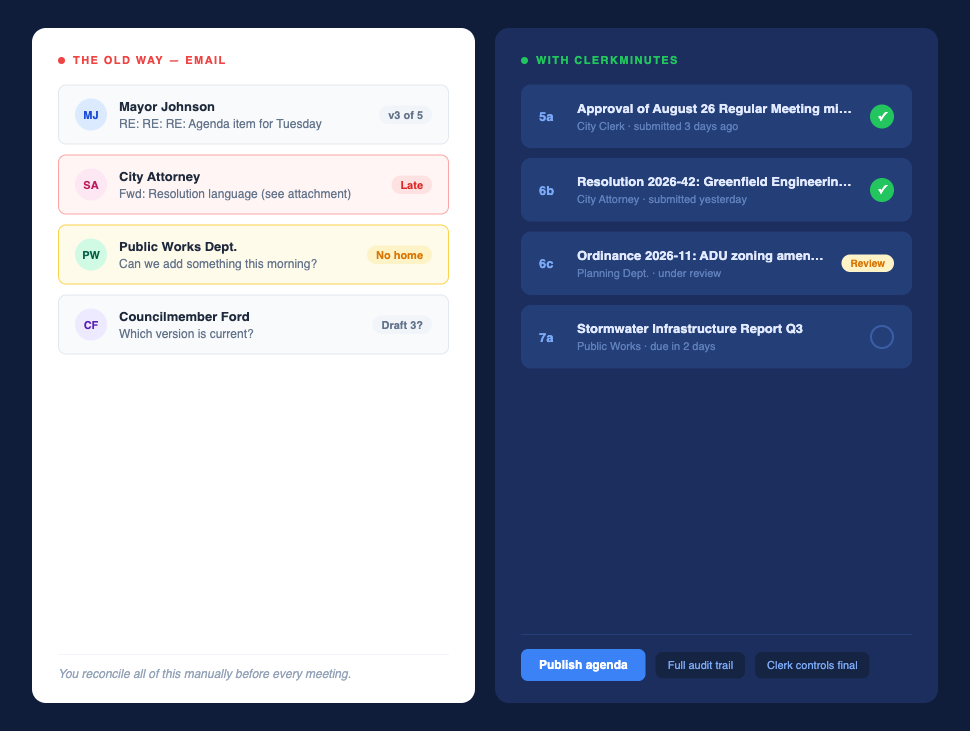
You sent the email two weeks ago. “Please submit your agenda items by Thursday.” One response came on Friday. Two more Monday morning. An attachment showed up Tuesday with no subject line and no clear home on the agenda. The morning of the meeting, “Can we add something?”
Nobody else sees the full picture. Department heads track their item. Elected officials track theirs. You track everything that is missing, everything that came in wrong, and everything that still needs a home on the agenda before it goes out.
Department heads who miss your deadline face no real penalty. The agenda goes out either way because you fill the gaps, make the calls, chase the stragglers, and hold the whole thing together before every meeting. Every gap in the process becomes a task on your list, because you are the connective tissue and the process allows it.
What a functional collaborative agenda process requires
A functional collaborative agenda process starts with one version everyone is looking at. Every contributor sees the same draft.
Deadlines also need real teeth, not the kind you enforce manually by sending follow-up emails, but the kind built into the system itself. Automated reminders go to contributors when the deadline approaches. If they miss it, they miss it. You do not chase them.
The audit trail matters more than people realize. If someone claims they sent you an item, you need a record. Without it, every dispute about what was submitted and when falls on you to resolve. Who submitted what and when has to be trackable, not reconstructed from your inbox.
Final control stays with the Clerk. Contributors can submit and update items up to a point, but the published agenda is yours to approve. Nothing goes public without you.
What breaks when you run it over email
Version chaos is the most visible problem. Attachments multiply. People reply to different threads. Someone is working off draft three while you are on draft five. By the time the agenda is finalized, nobody is certain which version is current.
Late submissions do not have a natural home. When something arrives in your inbox the morning of the meeting, you have to figure out where it belongs on the agenda, whether it satisfies the notice requirements, and whether there is still time to do anything about it.
There is no audit trail. Who submitted what, when they submitted it, and what version they sent is not tracked anywhere. If someone disputes the record later, you have nothing to point to.
Then there is the after-the-fact request. “Can we change this?” lands in your inbox after the agenda has already gone out to the board. At that point, you are either making a change that creates a version mismatch between what the board has and what you have on file, or you are telling someone no and managing the fallout.
You reconcile all of this manually before and after every meeting. That is a hidden cost.
How to set up a collaborative agenda process
Start by building your agenda structure once in a platform like ClerkMinutes where you already handle your meeting minutes. Headers, numbering, logo, and the format you use for each board become agenda templates. If your city council meets the first Tuesday of every month, that structure is waiting for you.
Then, you can assign items to specific contributors with due dates. You can see who submitted, what they submitted, and exactly when.
Contributors submit directly in the platform. When the city attorney submits resolution language for Item 6b, it lands under Item 6b. You see it, review it, comment on it, or approve it without forwarding it to yourself and hoping you remember where it belongs. If the description needs more specificity before it goes public, you flag it before it goes out. If someone later claims they sent you something and you have no record, the platform log resolves that.
When the agenda is ready, you publish it. One-click export to your municipal website as well as a PDF. The agenda packet assembles automatically as items and attachments come in. Every attachment is organized by agenda item number. You are not building the packet by hand the night before the meeting.
Pro Tip: For a closer look at how ClerkMinutes Agenda Builder handles the full workflow, the product tour walks through each step.
Where the agenda process still breaks
Even with the right setup, there are three places where this can go sideways.
- Letting contributors edit after you finalize. Once you have approved and published the agenda, contributors should not be able to make changes. Use the publish workflow to lock the agenda. If something needs to change after that point, it comes through you.
- Skipping the agenda packet step. Publishing the agenda without the attached materials means board members go into the meeting without the documents they need to participate or vote on anything. Build the packet as you go, not as a last step.
- Setting up contributors before you set up the structure. The order matters. Build your agenda headers and format first, then assign contributors to specific items. If you do it the other way around, contributors are submitting to a structure that is still being built and items end up in the wrong place.
If you are still chasing agenda items over email, there is a better way. ClerkMinutes handles the submissions, reminders, and packet assembly, so the agenda is done when it needs to be, without you manually holding it all together. Try it free for 14 days. No credit card required.
FAQs
Can department heads edit agenda items directly, or can they only submit them?
Contributors submit items. The Clerk reviews and approves. Contributors cannot edit an item after the Clerk has approved it, and they cannot make changes to the overall agenda structure. You control the final document at every stage.
What happens when someone submits after the deadline?
The item still comes in, but it is flagged as late. You decide whether to include it. The system does not automatically add late submissions to a finalized agenda. That call stays with you.
Does the agenda automatically carry into the AI-generated minutes?
Yes. The agenda structure you build in ClerkMinutes carries directly into the minutes. Sections, item numbers, and headings are already in place before the meeting starts. For more on how the agenda and minutes connect, see how to craft an effective meeting agenda.
Can we upgrade from Starter to Plus without losing our existing agendas?
Yes. Upgrading your plan does not affect your existing agendas, templates, or meeting history. Everything carries over.
What do we do with an elected official who will not use the system?
This is the most common friction point. The practical approach: the Clerk enters the item on the official’s behalf when it comes in through the usual channel, email, phone call, whatever, and the official gets a record of what was submitted and when. The system still gives you the audit trail. You are just the data-entry point for that person.
Keep reading
How a fast-growing Florida county stopped falling behind on meeting minutes
See how one Florida Clerk cut hours from meeting minutes with ClerkMinutes.
The North Carolina Town Clerk Who Turned Eight-Hour Meetings Into 45-Minute Turnarounds
How Heather Minor, Town Clerk at the Town of Longview, went from multi-day transcription marathons to done-by-Tuesday
No more couchwork
How St. Louis Park, MN cut a month-long meeting minutes backlog down to 30-45 minutes.
ClerkMinutes
®
HeyGov, Inc.
Sturgeon Bay, Wisconsin
Toll-Free:
Email: